Showing posts with label Mobile. Show all posts

Alienware Android Phone


Google and Dell are on the point of launching a new mobile phone to run on the Android operating system, probably at the 3GSM World Congress in Barcelona that’s going on at the moment. Dell have tried to enter the mobile phone market once before but their range of PDAs was a complete flop.

Well, would you buy a Dell phone? Exactly.

Dell have also recently acquired Alienware, the trendiest tech company in the world, an expert in Video, Gaming, and Audio, and a company crying out for a mobile phone.

So here are the first pictures of the Alienware mobile phone!
  • Classic Alienware eye catching design
  • Large screen with high resolution
  • Superb video gaming capability
  • Fantastic Audio
  • Built on the Google Android platform


Inside the iPhone 5


Check what is the price of actual iPhone 5 and what you pay


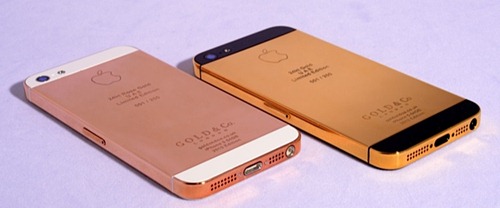
24kt Gold-Plated iPhone 5 Now Available


The company is renowned for adding sheets of gold plating on some of the most sought-after gadgets on the market, and the iPhone 5 – which released on Friday – is certainly the most-wanted device on the market at this point in time. As you can see from the images, the already aesthetically-pleasing device looks stunning laden in solid 24k gold, and although we ourselves don’t have that kind of cash to splash on gold-plating, we’d have to prefer the black model, based on the images. The White & Silver model seemed to be your favorite based on the poll we threw up on Facebook over the weekend, but alongside the gold plating, the darker of the two iPhone 5 configurations certainly oozes the most sophistication.

Prices have yet to be revealed, although having contacted the company personally, I was advised the iPhone 5 would cost $4600 for the gold, with the Rose gold weighing in at around $5000. Considering a 64GB iPhone 4S gold plated by the same company will set you back around $4,300, it seems the predictions aren’t too far off what they’ll retail for, but nevertheless, you’ll really have to push your usual smartphone budget out should you wish to add such a luxury touch to your prized asset

If money was no object, and you were planning to smother your iPhone 5 in delicious gold, which color would you choose? Would the images sway you from your previously-decided favorite?


iPhone 5 User Guide Now Available


The iPhone 5 arrived last Friday, and already in excess of five million consumers have snapped the device up, but contrary to how most electronic gadget vendors handle things, the full user guide wasn’t packaged with the smartphone, but released online some hours later along with a user guide for those diving into iOS 6.
 
Many of you will have already gotten to grips with the new smartphone and its accompanying software, and although there are quite a few updates in iOS 6 versus iOS 5, it’s not particularly difficult to begin using without the help of the documentation. Still, the small Fingertips user guide which comes in the box of the iPhone 5 is nowhere near sufficient if one wishes to get the very most out of their recent acquisition, so if you want to get your money’s worth, search the iBookstore for "iPhone User Guide For iOS 6."
 
In its release notes, Apple describes the The iPhone User Guide as "an essential part of any iPhone library," although not – it would seem – important enough to slot into the meticulously-arranged box.
 
Still, aside from your general iOS bits and pieces, the guide will give you a stronger insight into the new party guests such as Passbook and, of course, the Maps app which has seen consumers and experts falling over each other to criticize. Google has promised it will bring its Maps offering to iOS through the App Store, although former Apple board member and Executive Chairman of the Mountain View-based search giant Eric Schmidt has quashed rumors it had already been submitted for review.
 
Even if you’re very comfortable using iOS 6 and your new iPhone, there might just be that elusive tidbit of information you need in the future, and if you’ve the guide handy, you may avoid an hour or two trawling Google.
 
 
Download here:iPhone User Guide For iOS 6


Apple iPhone 5 Vs Samsung Galaxy S III


So, the event has finally been and gone, and before I get started on comparing the two biggest smartphones on the market, it’s pretty funny how such a long-winded spell of rumor and speculation can be put to rest in less than two hours, isn’t it? If you’ve been anxious for Apple to come out and pay heed to all the leaks then I can most certainly empathize, and barely does the iPhone 5 get to rub its eyes for the first time than it is swiftly thrown in at the deep end with the Samsung Galaxy S III.

It’s the unavoidable battle of the two most popular mobile device series of recent years, and although the Galaxy S III was, in hardware terms, far superior to the iPhone 4S, the iPhone 5 is certainly more adept to compete with the Korean company’s flagship smartphone.

With a much powerful A6 processor, and a much-improved, taller 4-inch display, Apple’s iPhone is no longer blown out of the woods by its larger-than-life rival, and here, we compare the vital statistics of each device:


iPhone 5 tech specs:
  • Display: 4-inch (diagonal) with a resolution of 1136 by 640 pixels.
  • Memory capacity: 16, 32 or 64 gigabytes, depending on price. There's no way to expand it with memory cards.
  • Price: Starting at $199, for 16 gigabytes of memory.
  • Size: height: 4.87 inches; width: 2.31 inches; depth: 0.30 inch (124 x 59 x 7.6 mm)
  • Weight: 3.95 ounces (112 grams)
  • Cameras: 8-megapixel camera on back, 1.2-megapixel on front.
  • Video recording: high-definition (1080p -- comparable to the resolution of a 40-inch flat panel TV) up to 30 frames per second with audio
  • Battery life: talk time is up to 8 hours on 3G. Internet works for up to 8 hours on LTE and up to 10 hours on Wi-Fi. Up to 10 hours of video playback. Battery can be replaced by service personnel only.
  • U.S. wireless carriers: Verizon Wireless, AT&T, Sprint Nextel and others.
  • Network compatibility: 3G networks worldwide, plus 4G LTE networks in the U.S., Canada, Japan, Germany, U.K., Australia, South Korea, Hong Kong and Singapore.
  • Operating system: Apple's iOS 6 (will also be available for download to older iPhone models)
  • Near-field communications: None.


Samsung Galaxy S III tech specs
  • Display: 4.8 inches (diagonal) with a resolution of 1280 by 720 pixels.
  • Memory capacity: 16 or 32 gigabytes. Can be expanded by up to 64 gigabytes with a memory card.
  • Price: As low as $99 for basic model
  • Size: height: 5.4 inches; width: 2.8 inches; depth: 0.34 inch (137 x 71 x 8.6mm) 
  • Weight: 4.7 ounces. (133 grams)
  • Cameras: 8-megapixel camera on back, 1.9-megapixel on front.
  • Video recording: high-definition (1080p -- comparable to the resolution of a 40-inch flat panel TV) up to 30 frames per second with audio.
  • Battery life: Up to 9 hours of talk time (depends on network). Battery replaceable by user.
  • U.S. wireless carriers: Verizon Wireless, AT&T, Sprint Nextel, T-Mobile and others.
  • Network compatibility: 3G networks worldwide, plus 4G LTE networks in the U.S., Canada, South Korea and some other countries.
  • Operating system: Ice Cream Sandwich version of Google's Android
  • Near-field communications: A chip lets the phone act as a credit card at some payment terminals and share data wirelessly when tapped against some other phones.

So that’s our short analysis, but what do you guys think? Is Apple’s latest device a more/less favorable option than the S III? Or do you still remain on the fence?


Activate Google Voice Search on Your iPhone

Voice activation is surely going to be an important addition in future versions of iOS. Apple is also working hard to enhance the functions of Siri and make it more useful from a consumer perspective. For activating voice searches using Siri, users usually have to tap on a text field and tap on the microphone key.

This process is further shortened and enhanced by a new jailbreak tweak called Voice Search. Voice Search tweak allows users to execute Google voice search from anywhere on your iPhone. The tweak functions by adding an extra feature to the iPhone’s setting called ‘Activator’.

Voice Search does not come along with icons or settings and is completely set up through the Activator. A gesture for activation has to be provided which can be used to invoke the listening mechanism. When a search has to be performed, Voice search is activated through the gesture and you will have two options once you have spoken the query. You can either accept the query and do its search by clicking on ‘Done’ or you can choose to ‘Cancel’ the query and provide a new one.  

The gesture by default is a double tap on the status bar. When you perform that action, a pop up window titled ‘Speak now’ with a microphone icon will appear. You will provide the search query on this window. If you are using BrowserChooser package, the searches could be opened in Google Chrome by choosing it as the default browser. If you are not using the BrowserChooser package, the searches will be opened in Safari by default. 


Voice Search is available for free download from the Bigboss repository


5 Messaging apps for Mobile Phone:

The recent ban on bulk SMS has left many furious, especially youngsters who rely on it to stay connected with friends and family. If you are into heavy texting and chatting with friends and family, then the recent extension of 20 SMS cap may also not be sufficient. In this mobile-age, there are several messaging applications and software that would come to your rescue. We’ve listed some such apps. Needless to say, popular mobile platforms have their App Stores inundated with apps, but owners of feature phones running on Java also have a couple of options. Let's take a look at some of the options available:

1. Nimbuzz:The Nimbuzz messenger is a great alternative to your usual SMS. It allows sending messages, photos, music and even videos. It helps keep expensive (SMS) text messaging or multimedia (MMS) charges at bay. Moreover, it supports all leading mobile brands and even the lesser known ones, which means it is compatible with smartphones as well as feature phones from Samsung, Nokia, HTC, Lemon, Alcatel and more. Nimbuzz users can also join chat rooms to make new friends. Furthermore, Nimbuzz can also be used on your PC or Mac.

This app is Available for Android, BlackBerry,iOS, Java/MiDP/J2ME, Nokia


2. eBuddy:
eBuddy is yet another web and mobile messenger service that could come to your rescue. eBuddy XMS could easily replace your exorbitantly priced SMSes. It allows users to send texts, fun-filled emoticons, pictures, videos and more. The web client supports all browsers. Besides, the app aggregates all your IM networks like AIM, Facebook Chat, Gtalk, ICQ, MySpace, Windows Live Messenger and Yahoo! in one place. This service is available in more than 30 languages.

This app is Available for Android, BlackBerry, iOS,  Meego, Windows Phone 7


3. Pinch:
This app may not be very popular but it’s quite effective. Users can send and receive SMS like text messages to anyone in their address book from Pinch. Moreover, your friends don't even need to have the Pinch app to get your message. The app supports group messaging functionality and can be used on almost all platforms, including Java and Symbian. It takes off the limitation of exchanging messages with only those buddies who have the application installed.

This app is Available for Android, BlackBerry,  iOS,Java, Symbian


4. WhatsApp:
This messaging service needs no introduction. It has become quite a rage among mobile friends. WhatsApp is a trending messaging service that lets you keep in touch with a neat chat-like interface and allows sharing images, audio and video files instantly. Users can form groups and stay in touch with pals all along.

This app is Available for Android, iOS, Blackberry, Symbian (S40 and S60) and Windows Phone (Windows Phone 7.5 and above)


5. Fring:
Fring is a popular alternative to your usual SMS. Just like most of the messaging apps, it supports on-the-go live chatting and also video chats. Interestingly, it also supports group video chats, allowing up to four users to video chat. Besides, it also supports free voice calls and cheap international calls.

This app is Available for Android,  iOS, Symbian


5 Security apps for Android devices

The Android smartphone market caters to every budget segment with its range of low-end budget-phones, mid-level feature-loaded smartphones and high-end power packed smartphones. Now, you wouldn’t want your expensive phone to be stolen or data to be misused either. Needless to say, if you own an Android, it better be safeguarded against the growing number of vulnerabilities in the Android Market aka Google Play too, which have almost quadrupled in the past one year. To safeguard your device against such threats, there are a plethora of apps for Android. We’ve picked 5 such apps for our readers:


1. TrustGo Antivirus & Mobile Security
The TrustGo Antivirus Mobile security is capable of scanning your phone and SD card to remove all the malicious content – viruses, malware, spyware and trojans. Its capabilities extend beyond scanning for viruses as it can alert users about malicious websites and also monitor and manage the phone’s data/memory usage, and battery consumption. It also lets you take backup of all the data on the cloud. The device is infused with some security features too, which can lock or wipe off data remotely in case of theft.


2. Webroot Security & Antivirus:
The Webroot app has all the security features that one may look for to protect their smartphone, be it scanning for viruses, blocking unwanted calls/texts, locating a stolen/lost phone, remotely locking a device or block phishing websites. But what we liked even more is its ability to lock the device automatically if the SIM card of your phone is removed. However, this feature comes for a price and you will need to upgrade to the Pro version. The Pro version also brings in features like remotely wiping data of a lost or stolen device, battery status and power usage monitoring, and keeping a tab on prying apps.


3. Where’s My Droid:
This app is like old wine; it just gets better with each year. Open the application and you will see a neat interface with a list of setup options namely, Ring Setup, GPS Setup, Security settings, Commander and Advanced Menu. The app will let you ring your phone (even using a loud siren) incase you have misplaced or lost it, and will do so even if you have kept your phone on the silent mode. Then there is GPS setup to track and find the location of the phone. All this just needs the user to send an SMS with the ‘attention words’ (you need to setup ‘attention words’) from another phone. For instance – by default you can text ‘wmd ring’ on your misplaced phone and it will implement the Ring feature and your misplaced/stolen device will start ringing loudly. The Commander feature has been crafted to offer users complete control of the device from WheresMyDroid.com.


4. Anti-theft Droid:
Here’s another app geared to save your dainty droid. This can be called one of the best free anti-theft softwares and controls the actions of your device via text messages. It can track location of your device on net (approx) and GPS (exact). It can even automatically activate the GPS and does not have a large impact on the battery life. The phone can be viewed on the map and has a fire alarm audile anti-theft device which can be disabled only with a password. It can even identify the exchange of phone chip and sends the phone's location at the time of exchange of information in the new Chip (Carrier, IMEI, phone number (if supported by the new chip). It doesn’t require internet connection and one can even hide the antitheft Droid list of applications.


5. Trend Micro Mobile Security:
We had recently got our hands on the Trend Micro Mobile Security suite – Personal Edition for Android. In our verdict, we found it to offer good value. It locates your lost phone and displays the exact location on the map, allowing you to scream, wipe off data and lock the phone remotely. It also scans your phone for rogue apps. The premium features include the Surf, Call and Text security, which lets you toggle safe surfing, parental controls, call blocking and text blocking. All these options can be further customized.


Official uTorrent App For Android

As far as file sharing goes, BitTorrent is one of the most frequently-utilized platforms, and in terms of clients, uTorrent (stylized µTorrent), is easily the most popular. Its clean, minimalistic interface and resourceful nature are the two key reasons for the application becoming the most popular around, and for the some 480 million Android users, that ease-of-use can now be enjoyed on Google’s market-leading platform.

Torrenting hasn’t really had its day on mobile devices, and although there are plenty of promising apps doing the rounds on all the big ecosystems, most .torrent file downloaders and uploaders stick with the bread-and-butter familiarity of the desktop iteration. Yes, a minority download their torrents using specially-crafted apps, but the farthest most have gone to torrenting on a smartphone or tablet is using one of the many remote-based apps – allowing one to control, pause, or delete files on-the-fly.

Like VLC, which very recently released to the Google Play Store as a beta, the uTorrent Android app will likely be met with a warm welcome from mobile device-toting file sharers. Of course, it’s more than likely Apple will never, ever let such an app grace its stringently-moderated App Store, so if you do indeed wish to download your content on the move, you will either have to jailbreak your iOS device, or consider migrating over to Android.

The uTorrent app, seems pretty stable, although the beta moniker suggests you should not rely on it for heavy-duty, important file transfers. It works for most Android versions (compatibility runs all the way back to Éclair would you believe), and can be downloaded right now from the Google Play Store – linked at the foot of this post.

You might expect – given the obvious restrictions of using a smartphone or tablet compared with, say, a desktop – that the app would be crippled by caps on download file size or bandwidth, but as long as your device has the capacity and the means to download or upload, you’re good to go.

Although the uTorrent desktop client has always been free, the Play Store description notes it’s only "currently free", so it’s definitely worth grabbing, if only for safe-keeping.


(Source: uTorrent for Android on Google Play)


Lets You Send Out Tweets Using Your Voice

It seems that tweeting is the new form of texting these days, and if you aren’t a part of the Twitter using clan, then I would highly recommend you register yourself and see what all the fuss is about. The popularity of Twitter is increasingly obvious due to the massive array of third-party apps and clients popping up everyday for different desktop and mobile platforms. One of the latest to find it’s way into the mobile world is the Voice Tweet app that does pretty much as the name suggests.

First of all, let’s discuss the basics of the app;it is a universal creation for the iPhone, iPod touch and iPad. The ability to tweet with audible commands is definitely something that is of benefit to users. Some app owners may find themselves in a vehicle and therefore can’t use their hands, or may just prefer the speed which speaking brings over having to physically type it in. Voice Tweet does have efficiency on its side, with claims that audibly dictating a tweet is up to five times faster than actually typing it out using the on-screen keyboard.

A number of globally recognized languages are also supported by the app, meaning that a lot of users can send their tweets out in their native language rather than having to force out some English. Grammar correction is also a part of the app’s make-up, as well as being able to learn and improve upon its own speech recognition over time. An extremely simple user-interface that consists of one simple tweet button to invoke the speech listening completes the $0.99 app.

When taking all of those things into considering and conjuring up the images of how the app works in your head, you might be presented with a mental image of something that already exists along these lines. Ah yes, Apple’s digital assistant Siri. The ability to send tweets through Siri commands will be with us in a couple of weeks thanks to iOS 6, meaning this app will be pretty much redundant to those who upgrade their firmware to get all of the new goodness that is packed into the new OS. Nevertheless, some people may find Voice Tweet useful, if only to support third-party development.


iPhone To Come With Redesigned Headphones

On top of the slew of recent alleged leaks of the next-generation iPhone, another tidbit has surfaced claiming that the infamous earbuds that come with the iPhone will be redesigned. Many have criticized the existing Apple headphones for being ill-fitted and under performing, especially considering their standalone price of roughly $30. Clearly aware of the criticisms present, Apple is rumored to be addressing these issues with the release of the new headphones.

The news came from a Vietnamese website Tinhte, in the form of photos and videos that revealed possibly better fitting earbuds. As you can see, the video below gives a thorough walkthrough of the new aesthetics of the earbuds. As of right now, Apple offers two different earbuds, and these – aesthetically, at least – appear to be a combination of both. They are a bit more rounded than the ones that currently come bundled with the iPhone, and I can already tell that they are much better fitting. As an owner of Apple earbuds, I can tell that if they just fit a bit more snugly in my ears, audio quality would be significantly better.

Since the launch of the original iPhone back in 2007, there have been little to no changes made to the headphones that are bundled with each device. And, in many cases, people end up purchasing other headphones anyways due to the quality of the Apple-bundled ones.

Recent leaks have suggested that the company is planning to launch a 4-inch screen, thinner, lighter iPhone with a slightly revamped design. It is rumored to have a new, smaller adapter, new material in the back in place of complete glass to prevent the device from easily shattering, and other minute changes, such as the relocation of the headphone jack from the top of the device to the very bottom. Of course, all of this is still rumored, but given the sheer amount of leaks suggesting the same device from multiple different sources, we can assume that we’ve been given a decent glimpse at the upcoming iPhone.


iPhone Keeps Your Device Charged Using Solar Power

It’s a horrible but an oh-so-familiar feeling, and unfortunately one that comes as part and parcel of owning a portable but power hungry device like the iPhone.

If the iPhone that you own happens to be running any variant of iOS 5, then it’s pretty much guaranteed that you’ve suffered from this affliction. As you would expect, plenty of products already exist on the accessories market that try and alleviate the issue by allowing a case that is essentially a battery pack to be plugged into the device to act as a secondary power source, most popular of it being from Mophie. The battery packs are great little inventions, and although they add a little extra bulk to the device, it’s a small price to pay to get an extra few hours or more usage out of the iPhone.

Although the additional usage is great, any purchased battery pack comes with its downsides. First of all: the cost. The good ones that last a decent amount of time do end up carrying a pretty hefty price tag, you are essentially paying for a product that also comes with its limitations. Additionally. the cases that contain a battery pack are just additional batteries and therefore suffer from the exact same problem which the iPhone does – if you aren’t near a power source, it will ultimately run out.

Until we learn to find a compact power source that never runs out or can be renewed easily, then a case with a battery pack and included solar cells that charge the device using the power of the sun will have to do. The new buzz word seems to be renewable, and considering the iPhone is at the forefront of technology, it makes sense that the accessories are as well. For those who pretty much need battery life all the time, for $79 you can pick up the Monster Watts case that not only gives an additional battery kick, but also takes the power of the sun and transforms it to usable energy to power the iPhone. Colorful, stylish, relatively low priced for what is and extremely useful product, what more could you need from an accessory?


iPad Mini Launch Expected in October-2012

Since the launch of the original iPad in 2010, rumors regarding Apple secretly working on a smaller version of iPad have been rife. And now, it seems that these rumors might turn out true really soon. As the tech maniacs are already expecting the launch of Cupertino based giant highly anticipated iPhone 5 smartphone on September 12, lately, numerous report have also suggested the Apple will unwrap the iPad Mini alongside the handset.

The latest report from DigiTimes says that, “supply volume of Apple’s 7.85-inch iPad is estimated to reach four million units per month starting in September in order to prepare for demand from year-end holidays, according to sources from the upstream supply chain.”

Though this is just a rumor right now, however, there is a possibility of consistency in it as it goes along with the earlier rumors claiming that the iPad Mini will be unveiled alongside the next iPhone on September 12.

However, many industry experts are doubting this release date, as much has not been heard about the device from the company sources’ end as compared to the rumor mill of iPhone 5. Consequently, a report by Daring Fireball has been swirling in media that claimed Apple will be reserving the September 12 event only for the announcement of the next iPhone and iOS 6, while it will unveil the iPad Mini and the new iPod Touch at the iTunes event, which is scheduled to happen in mid-October.

If the October release information is confirmed, then this will be close to the release of the Windows 8 based Microsoft Surface tablet, which is reportedly a direct competitor to the Apple’s new iPad.

Moreover, in Fall 2012, numerous manufacturers like Samsung, Microsoft, HTC and others are coming up with their flagship products, tipping that the upcoming season will see many major product launches.

Features:
An earlier report by 9to5Mac listed the rumored features of the smaller iPad based on the leaked images and design schematics. The list goes on stating that the tablet will have slimmer side bezels, separate volume buttons, two front cameras, same form factor as the iPod Touch, 7.2 to 7.3 inch thick and possibility of LTE connectivity. However, these are rumored features and they are not confirmed by Apple.

When it comes to its pricing, analysts assume the iPad Mini to be priced at $299, which will create an impact on the sales of the Amazon Kindle Fire and Google Nexus 7, the two 7 inch Android tablets priced around the range of $199.


Samsung Galaxy Note 800: The 10.1-inch Tablet

For all the Samsung the fanboys in the nation, finally here is the good news for you. The much-awaited Galaxy Note 10.1 by the South Korean giant has landed on the retail shelves, It is selling with a name of Samsung Galaxy Note 800.

For those who are not aware, the tablet was unveiled at the Mobile World Congress 2012 in February, at that time itself the Korean tech giant promised that the tablet will be made available in the market in August 2012.

Consequently, the Galaxy Note 800 16GB was available for pre-order across the world from August 15, On Thursday, Gizbot carried a report stating that the 10.1 inch tablet will hit the stores.

Coming to the specifications of the Galaxy Note 800, the 10.1 inch tablet, it carries a dimension of 262 x 180 x 8.9mm and weighs 580 grams. The tablet sports a a 10.1 inch capacitive touchscreen display with a resolution of 1280 x 800 pixels with the S-Pen stylus support.

Moreover, the Galaxy Note 800 runs on Android 4.0.3 Ice Cream Sandwich OS and is powered by a 1.4 GHz quad core Exynos processor and 2GB RAM. It sports a 5MP rear camera and a 1.9MP front camera. Galaxy Note 800 is packed with a 7,000 mAh Li-ion battery.

Furthermore, Galaxy Note 800 comes in three configurations – 16GB, 32GB and 64GB.


Add Shortcuts To The Home Screen On iPhone

The IconToggles tweak that has just landed in the Cydia store is certainly one that would appeal to others who are like me and hate things being hidden away two or three menus deep.

The package comes courtesy of VincenzoBB and offers users the chance to take up the entire real estate of a home screen page by populating it with sixteen individual icons that look like standard applications but exist to give quick access to a variety of different options that the developer believes will be useful to end-users. The package is compatible with all jailbroken devices so is a truly universal installation, although access to shortcuts such as placing a new call will be limited to the iPhone for obvious reasons.

When installed, users will have the sixteen icons placed that offer the ability to quick begin a new mail, new text message or place a new call. Power options are also included with quick access to repsrings, reboots and power downs as well as being able to enable or disable location services at the touch of an icon and quickly edit wiggle mode without having to hold down on the icon for a number of seconds. Access to this kind of functionality isn’t really anything new with plenty of Notification Center based widgets and other packages already offering this type of thing, but the icon format will definitely appeal to some.

Sure we have seen similar offerings in Cydia before, like UsefulIcons, but IconToggles offers more options to add as shortcuts on the home screen.

IconToggles is available to download from the Big Boss repository for $1.99 and requires a jailbroken device with iOS 5 or above installed.


HTC announces software updates for One X phones

The first official software update for HTC One X smartphones is the latest news in the Android market. The new update will bring the version number of the phone to 1.28.401.9. It is a 30MB update. Users have to enter into ‘Settings > About > Software Updates‘ for accessing the new update. If the phone is network-branded then approval from carrier is needed before updating. The update is purely based on Android 4.0.3.

The on-screen menu options in various Google apps including YouTube will function efficiently without any troubles with this new update. The automatic brightness has been pared back as well. The battery life issues with this gadget right from its launch are fixed with this new update. The bugs which caused garbled text and certain icons notification bar have been eliminated with this update. 

Company officials mentioned that the gadget requires at least 35% battery at the time of update. They also warned that charging the gadget while updating may lead to interference in the process. They also warned that users are not allowed to make even urgent calls which may result in update failure. So the users have to be in full alert when the update takes place. 

HTC One X smartphones is good for photography with a high resolution rear camera and powerful front camera. With the efficient front camera, video chats and call are much more effective. Efficient data transfer will be made possible with full Bluetooth connectivity. With good display size and dimension, videos and movies will be much more impressive.

HTC fans are glad with the news of the new update from them. Even though it fixes only a few problems according to the reports, users can expect much more when the actual update rolls out. Company officials stated that consumers can expect further interesting updates in the future as well. The future updates will be sure to clear off almost all possible bugs. This HTC smartphone is made even smarter with the new update.


iPhone Uses Front-Facing Camera To Measure Heart-Rate

Developers and development teams are always attempting to come up with new and interesting ideas for mobile based applications as well as thinking of innovative ways to reinvent things that have already been done in the past. The official iOS App Store is so jam packed full of apps that it can sometimes be difficult for developers to come up with something new, but for those that are willing to invest the time and effort into producing something truly innovative then the rewards more often than not speak for themselves.

On the face of things, the Cardiio app in the App Store doesn’t sound like it offers any outstanding or new functionality to users as it is designed to give an accurate indication of the user’s heart-rate. There are already plenty of applications in the Health & Fitness category of the App Store that use personal information and intensity levels to perform various calculations such as the users current heart rate or their target heart rate for physical training. However, the Cardiio application is a little different in that it has been designed and developed around cutting-edge research from the Massachusetts Institute of Technology (MIT).

The software, available as an iPhone or iPod touch application, uses the front-facing camera hardware on the installed device to track, read and finally analyze the amount of light that is reflected off the face. This may seem like a wind-up at first glance, but the complex algorithms and backend calculations allow the application accurately measure the users pulse without needing to purchase or connect any additional hardware. One of the reassuring things about Cardiio, is that the studies behind the application have shown that the measured heart rate from the app are within 3 beats per minute of the same rate taken with a pulse oximeter.

Some users will prefer to download the app, scan their face and then sit back and stare at the results as if a tiny slice of magic has happened. On the other hand, some would prefer to actually dissect the app and see what is going on behind the scenes. The functionality is based around MIT Media Lab research and heavily feature the same principles that are adopted within the use of clinical pulse oximeters. When the human heart beats it pushes blood through facial vessels, which in turn causes the vessels to expand as they fill up. The end result is that more light is absorbed meaning there is less light to reflect off the users face, allowing the app to track and analyze what is there.

The simple but very gorgeous user interface of the application is broken down into measuring the hear rate, gaining an insight into the results and a settings panel that provides additional app information. The information overload really comes through the Insights section, with Cardiio giving some nice statistics about life expectancy and how the users results stack up against the averages. Apart from the fact that the app has a very attractive interface, it also goes to show that innovation can be applied to even the oldest concepts.


A Wide Variety Of Android Boot Animations

I like to keep my smartphone / desktop as close to stock as possible, and I’ll get to why I do that in a separate post sometime, but there are people out there for whom the ability to deeply customize an Android smartphone – from its kernel, ROM to the launcher, lock-screen, keyboard – is a game changing feature. It’s a big difference from iOS in which customization is, generally, changing the look or the working of something that is already part of the OS. In Android, you get to completely replace it with completely new code.

With that in mind, let’s discuss boot screen animations. Yes, I’m talking about the short animations you see every time you start your smartphone.

They, too, are customizable in Android.

Earlier today, we came across an awesome resource for Android boot animations which we’ve talked about after the jump.

The discovery comes by way of  a short post in which they discuss AndroidBootAnimation.com.

As you can guess by its name, AndroidBootAnimation.com is a website / blog dedicated to covering some of the best available boot animations for Android smartphones. They have all sorts of them, too, from boot animations of Nexus devices and custom ROMs like CM9, to custom made animations for fans of names like Alienware, Simpsons etc. etc.. Animations are also categorized by their resolution, so you can get one for your HTC Explorer or your HD display on the Samsung Galaxy Note; there is something for everyone!

Each post has a link to the boot animation’s .zip file and the developer’s official page where you buy them a coffee for the effort they put into their boot animation

Once you have downloaded the boot animation’s zip file, you can flash it to your device using an app like Boot Animations ★root* which is free, offers it own range of customizations, and comes with a wide number of features like converting GIFs to boot animations (and vice versa), previewing, randomization, and more.

We’ve posted all the relevant links below:
  • Download Boot Animations App [Google Play]
  • AndroidBootAnimations.com 


*As changing boot animations is a system-level task, you will need to gain root access your device first.


iOS 6 beta 4 - List of Features

The very first thing that you see after update, you will be prompted for your account details for iCloud. The second, YouTube app disappeared. The reason for the disappearance rather banal: the Apple ended license to use this application and the company decided not to renew it. But according to the representative of Apple, Google is already working on YouTube app, which would later appear in the App Store.

Slightly changed the appearance of calendar reminders. Privacy settings have been improved as well and new option was added. This option is Bluetooth sharing menu, so use the link to get more info about this option.

Passbook got new button which you can use to go to the App Store. While it is difficult to say about why they need it, but apparently in a short time is expected to emerge in the App Store a new section, such as coupons, tickets and so on.

Improved details of Apple’s own Maps and improved overall performance of this application. Also cash in Safari was increased from 5 MB to 25 MB.

After the familiar click on button to create a new message in Mail app, you will see in front of you unfamiliar folder Drafts: you can select either “New” or one of the drafts.

Other iOS 6 beta 4 features:
  • There are new options in the Password Protection: Voice dialing, Message Reply and Passbok.
  • Switch to alert the user about the general events in the Calendar has moved to Mail, Contacts, and Calendars in Settings app.
  • Game Center offers to find friends on Facebook.
  • Universal Access menu was supplemented by paragraph “Hearing Aids”.
  • Now you can activate Siri, making swipe from the bottom to up. Also there are updated Siri commands menu in iOS 6 beta 4 as well. Now you ask for sports scores, post on Facebook and tweet and even more.
  • The compression of images in the browser changed from 2 MP to 5 MP (most likely, it is necessary only to owners of the new iPad, at least for now).
  • A new ability to download data using 3G-networks, if there are problems with Wi-Fi connection.
  • Changed icons in Mail app.
Perhaps that’s all of most interesting and significant changes in iOS 6 beta 4. Although, of course, there’s a new lot. If you notice something very important that I missed – please write in the comments section.


Add A Live Facebook Timeline Feed To Your iPhone’s Home Screen

When it comes to mobile smartphones and the operating systems that power them, there is always going to be a great divide from users who prefer one platform over the other. We all know that the two largest mobile OSes in the game are iOS and Android, with each one having its own set of pros and cons when compared against the other. Apple fans will argue that iOS is a more powerful and intuitive OS, whereas Android fans love the control they have over their devices as well as the ability to have live widgets on their home screens.

I can’t argue with the benefits of widgets, as they do – in some cases – provide some great additional interactivity with the device, but the more experienced will know that jailbreaking an iOS device opens the system up to a whole world of powerful widgets. With that said, the Facebook Live Widgets package that has just landed in the Cydia store is an attempt by Bluemetal to bring some dynamic social network type functionality to the home screen and lock screen of a jailbroken iPhone or iPod touch. iOS is one of the largest mobile platforms in the world and Facebook is the king of the social networks, so what could possibly go wrong?

The new tweak is essentially a package that contains three individual widgets which allow the user to interact with Facebook and their timeline in a way that isn’t possible on a standard installation of iOS. The first two widgets are intended for use on the device’s home screen and differ only in their size. The physical dimensions of the widgets are designed to allow the user to either have two or three rows of app icons as well as the widget itself.

The third and final widget is intended for use on the device’s lock screen and commands the full available screen real-estate between the clock at the top of the display and the slide to unlock image at the bottom. In terms of functionality, all three widgets are the same and offers live streaming from the inputted Facebook account. After installation, the widgets need to be activated through the WinterBoard app and are refreshed automatically, and scrollable. One thing to consider when using these widgets is the possible additional drain on the device’s battery, considering they are always refreshing.

The Facebook Live Widgets package is available as a $0.99 download from the ModMyi repository with no specific mention of iOS version requirements.


More Like This

Related Posts Plugin for WordPress, Blogger...

AddThis